 Skip to content


SAP S/4HANA configuration tutorial
This tutorial follows the AUMTECH APM and IHB companion presentation across seven lessons. Work through the organizational settings, converters, payment objects, enrichment and validation, routing, In-House Banking and FI posting in sequence. Use the field tables to compare the configuration with the selected SAP screens.
Training example. The recorded SSA setup uses clearing area PF, IHB bank area SIUS, owner company code 1710 and participant company codes 3000 and 3001. These are example values. Confirm your own system release, master data, currencies, scenario rules and validity dates before applying a step.
View the seven lesson SAP APM and IHB video course for $99
APM and IHB functionality
Start by identifying the source instruction, the processing hub, the approval requirement and the account provider. APM validates and routes payment instructions. IHB maintains internal accounts, while configured BCM integration supplies the approval step for outgoing payment orders.
Course agenda
Follow four stages across the seven lessons. First understand APM and IHB functionality and payment scenarios. Then configure APM organization, converters, payment objects and validation. Next set up IHB master data and financial rules. Finally, trace PINO, POBO and intercompany payments through the expected accounting.
Examples and sandbox references
| Object | Supplied SSA course evidence |
|---|---|
| IHB owner | Company 1710 |
| Participants | 3000 payer, 3001 receiver |
| Bank area | SIUS, accounts 1 and 2 |
| APM clearing area | PF |
SAP treasury architecture
Source systems can include SAP ERP, SAP S/4HANA and non-SAP payment or payroll systems. APM provides the central processing context, while IHB maintains the internal accounts. BCM supplies configured payment approval, and the MBC Connector links the process to SAP Multi-Bank Connectivity. Bank Account Management, Cash Management and FI provide the associated account and reporting context.
APM functionality
APM centralizes payment instructions from SAP and non-SAP sources. The converter design standardizes supported incoming messages and prepares bank-specific output. Configured validation, bank-key watch-list screening and exception handling provide controls before the payment reaches the next processing stage.
APM payment processing
- Receive the instruction. The Input Manager receives the file or message and converts it to the internal payment representation.
- Enrich and validate. Complete the required payment information and apply configured checks for duplicates, bank details and bank-key watch lists.
- Determine the route and approval. Select the applicable payment path and, where configured, send outgoing orders for BCM approval.
- Create the output. Use the configured converter and payment format to create the outgoing instruction. In an integrated bank-connectivity design, send the resulting message through the MBC path.
IHB scenarios
- PINO — Payment in Name Of. Forward the instruction using the source debtor bank account. The forwarding example retains the participant account and does not create an APM G/L posting for that forwarding step.
- POBO — Payment on Behalf Of. Process the participant IHB leg and the external payment from the owner account as separate legs.
- Intercompany internal transfer. Move funds between affiliate IHB accounts through the internal account-management route.
- Bank statement forwarding. Receive the external prior-day or intraday statement centrally, then forward it to the subsidiary that owns the accounting. Configure local posting separately.
APM organization and converters
Build the organizational and interface settings before testing payments. The clearing area identifies the processing context. The channel, medium and format identify the incoming or outgoing interface and determine which converter applies.
APM configuration steps
- Define Clearing Area
- Internal Bank Key Assignment
- Local Cash Management Integration
- Set up Converter
- Define Channels for File handler
- Define Converter (new)
- Maintain Default Values
- Maintain Converter Attributes
- Define XML settings for Format converter
- Define Bank Areas for Account Management
- Account Type definition
- Manage In-House Bank Accounts – Fiori app
- Manage Bank accounts
- Maintain Number Ranges
- Define Payment Order types
- Define Transaction Type
- Assign Transaction Type to Payment Order Types
- Determination Rules
- Enrichment and Validation Checks
- Maintain E&V Check Set
- E&V Check Set Assignment
- Service Level Agreement
- Manage Route & Clearing Agreement
- Assign BCM approval Rules
- MBC connector integration
- FI Posting integration
Clearing area
SPRO > Financial Supply Chain Management > Advanced Payment Management > Basic Configuration > Organization > Define Clearing Areas
Configuration step: Create or copy the clearing area. Maintain its identity, processing calendars and release currency, then save the customizing entry.
PF currently uses EUR for release control. This field is separate from the USD currency of the IHB accounts.
| Key field | Value / required setting | Brief functionality |
|---|---|---|
| Clearing Area | PF in SSA | Separates APM processing and reporting |
| Short / Long Description | Name the processing unit | Identifies the clearing area for users |
| Gen. Calendar | 99 in SSA | Defines processing business days |
| Value Date Calendar | 01 in SSA | Determines valid value dates |
| Release Crcy | EUR in SSA; USD in notes | Currency used for release control |
Internal bank key assignment
SPRO > Financial Supply Chain Management > Advanced Payment Management > Basic Configuration > Organization > Assign Internal Bank Keys to Clearing Areas
Configuration step: Assign the internal bank identity to the clearing area so APM can recognize the in-house banking parties.
| Key field | Value / required setting | Brief functionality |
|---|---|---|
| Bank Country/Region | US | Identifies the bank-key country |
| Bank Key | 999999801 | Identifies the internal bank |
| Clearing Area | PF | Routes this identity to the APM area |
| AM Category | Inhouse Cash in SSA | Classifies the internal account provider |
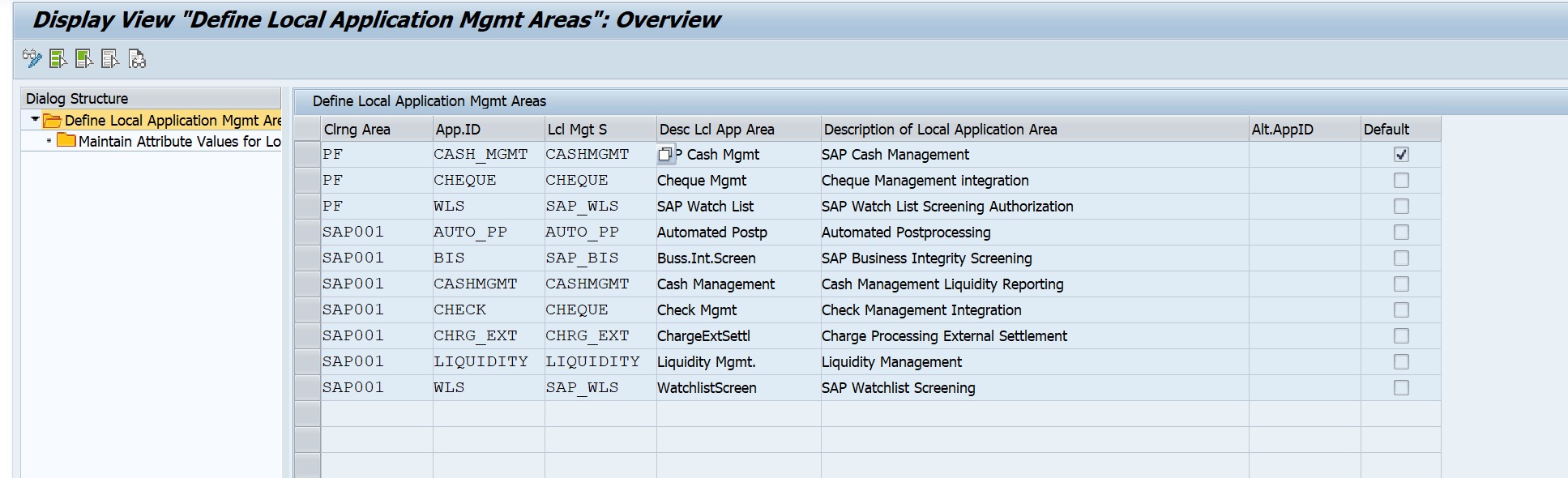
Local cash management integration
SPRO > Financial Supply Chain Management > Advanced Payment Management > Basic Configuration > Application Configuration > Define Local Application Management Areas
Configuration step: Reuse the delivered Cash Management system. Assign the local area to PF, then maintain its planning-type attribute.
| Key field | Value / required setting | Brief functionality |
|---|---|---|
| Clearing Area | PF | Scopes the local integration |
| Local Application Area | CASH_MGMT | Names the Cash Management area |
| Local Application System | CASHMGMT | Selects the connected application |
| Planning Type attribute | PF in SSA | Classifies generated memo records |
Set up converter format, medium, channel
SPRO > Financial Supply Chain Management > Advanced Payment Management > External Interfaces > File Handler > Basic Configuration > Set Up Converter > Define Formats for File Handler / Define Media / Define Channels for File Handler
Configuration step: Maintain the three identification lists first. Reuse delivered entries where they match the intended message and delivery method.
| Key field | Value / required setting | Brief functionality |
|---|---|---|
| Format ID / Description | /PAIN001; pain.001 input | Indicate format of incoming message |
| Medium ID / Description | /APP; application-server file | How incoming file/ messages is received – Local server, Application layer, Manual upload |
| Channel ID / Description | /CUSTOM; custom channel | External system that send file/message- Payroll, Treasury, AP/AR |
Converter definition
/PF1/04000043 SPRO > Financial Supply Chain Management > Advanced Payment Management > External Interfaces > File Handler > Basic Configuration > Set Up Converter > Define Converter (new)
Configuration step: Create the converter for the required channel, medium, format and direction. Assign a unique ID and the appropriate delivered converter class.
- SSA inbound class: /PF1/CL_IPM_P_XML_FORMAT_CONV. Outbound XML class: /PF1/CL_OPM_P_XML_FORMAT_CONV.
| Key field | Value / required setting | Brief functionality |
|---|---|---|
| Channel / Medium | /CUSTOM / /APP | Selects origin and delivery mechanism |
| Format / Direction | /PAIN001 / Incoming | Identifies input format and flow |
| Converter ID | ZP1IN | Unique reference to identify Converter ID |
| Class Name | Delivered inbound XML class | Interprets and maps the message |
| Description | Meaningful interface description | Meaningful interface description |
Inbound converter defaults
/PF1/04000043 > Select ZP1IN > Maintain Converter Attributes / Maintain Default Values
Configuration step: Select the inbound converter and maintain the defaults required when the source message does not provide the APM organizational or order-type values.
| Key field | Value / required setting | Brief functionality |
|---|---|---|
| Clearing Area default | PF | Assigns the incoming order to PF |
| Payment Order Type default | 000700 | Selects the incoming processing type |
| XML converter package | Delivered generic pain.001 | Maps supported input message versions |
| XML validation | Full validation | Checks the message against its schema |
Outbound converter attributes
/PF1/04000043 > Select outbound converter > Maintain Converter Attributes
Configuration step: Set the output stream and target format for the intended delivery channel. Maintain a file destination only for an application-server file output.
Current record: ZC53F uses FILE stream, logical file ZSSA_IHB_C53_XML and directory ZSSA_IHB_C53_DIR. ZP15B stays buffered.
| Key field | Value / required setting | Brief functionality |
|---|---|---|
| Output Stream Class | ZP15B: buffered NON stream | Controls where output is written |
| XML Format | /ISO_PAIN.001.001.05 | Selects the outbound message version |
| XML validation | Full validation | Checks the output XML structure |
| Logical file / Directory | ZC53F: configured file aliases | Resolves the server file destination |
XML framework and DMEE output
SPRO > Financial Supply Chain Management > Advanced Payment Management > External Interfaces > File Handler > Basic Configuration > Set Up Converter > XML Framework > Define XML Settings for Format Converter
Configuration step: Assign the matching XML format and validation settings. For DMEE-based payment output, select the required payment format and tree in the outbound design.
| Key field | Value / required setting | Brief functionality |
|---|---|---|
| XML Format / Version | Match input or bank schema | Selects the message representation |
| Converter mapping | Delivered format mapping | Transforms XML to internal data |
| Validation setting | Full schema validation | Rejects invalid XML structures |
| DMEE format / Tree | Bank-required payment format | Builds the payment-file structure |
Bank area for account management
SPRO > Financial Supply Chain Management > Advanced Payment Management > In-House Bank > Define Bank Areas for Account Management
Configuration step: Create the IHB bank area and assign the legal owner, internal bank identity, currency and business-day calendar.
- Bank area SIUS belongs to owner Company Code 1710.
| Key field | Value / required setting | Brief functionality |
|---|---|---|
| Bank Area / Description | SIUS / OM IHB Sandbox USD | Identifies the internal bank |
| Bank Country / Bank Key | US / 999999801 | Links to the internal bank identity |
| Company Code | 1710 | Owns the IHB subledger postings |
| Currency / Exchange Rate Type | USD / M | Defines bank-area currency and FX basis |
| Calendar | 99 | Defines bank-area business days |

Bank accounts and payment objects
Keep bank-account customizing, account master data and payment business objects distinct. The participant house-bank link is used by the source payment program, while the BAM technical ID identifies the bank account in the central setup.
BAM account type definition
SPRO > Financial Supply Chain Management > Cash and Liquidity Management > Bank Account Management > Basic Settings > Define Settings for Bank Account Master Data > Account Type Definition
Configuration step: Reuse or define a BAM account type with the contract type In-House Bank Account. Use that account type for participant IHB accounts.
The account type is customizing. The individual in-house bank account is master data in Manage In-House Bank Accounts.
| Key field | Value / required setting | Brief functionality |
|---|---|---|
| Type | 88 in SSA; IHB in book | Identifies the BAM account type |
| Account Type Description | IHB Current in SSA | Names the type for account selection |
| Contract Type | In-House Bank Account | Enables the IHB account contract |
Manage in-house bank accounts
Fiori: Manage In-House Bank Accounts (F5942) > Create
Configuration step: Create the participant current account after bank-area and BP setup. Complete the linked BAM data and release or activate the account.
SSA account 1 is linked to BAM 1000000025. Owner BP 1000241 uses role IHB200; each participant needs its own holder BP.
| Key field | Value / required setting | Brief functionality |
|---|---|---|
| Bank Area | SIUS | Selects the operating in-house bank |
| Currency | USD | Sets the account currency |
| Business Partner / Account Holder | 1000242 for company 3000 | Identifies the participant, role IHB100 PartnerCocode Links the BP to the company code it represents.- 1000242 – 3000 Trading Partner Identifies the affiliated company for intercompany accounting. It uses a company identifier, which can differ from the Partner Co Code |
| Opening Date | Approved opening date | Determines when the account starts |
BAM and house-bank account link
Fiori: Manage Bank Accounts > IHB account > General Data / House Bank Account Connectivity
Configuration step: Complete the BAM account associated with the IHB account and connect the participant house-bank account used by the payment program.
BAM technical ID 1000000025 identifies this account. The payment clearing account is 119902, derived separately.
| Key field | Value / required setting | Brief functionality |
|---|---|---|
| Account Type | 88 in SSA | Selects the IHB contract type |
| In-House Bank Servicer | 1000241, owner BP | Identifies the IHB owner |
| Bank Country / Key / Account | US / 999999801 / 1 | Links BAM to the SIUS account |
| Company / House Bank / Account ID | 3000 / IHB01 / IHBUS | Links the participant payment bank |
| G/L Account | 119900 in SSA | Defines the participant IHB position |
Payment order and item number ranges
SPRO > Financial Supply Chain Management > Advanced Payment Management > Payment Processing > Business Objects > Payment Order / Payment Item > Maintain Number Ranges
Configuration step: Verify or create valid intervals for the clearing area before processing orders. Assign the intervals required by the selected order and item definitions.
| Key field | Value / required setting | Brief functionality |
|---|---|---|
| Clearing Area | PF | Scopes the numbering object |
| Number Range / Interval | Available internal interval | Selects the sequence |
| From / To Number | Non-overlapping interval limits | Defines available document numbers |
| External indicator | Only for external numbering | Controls who supplies the number |
Payment order types
SPRO > Financial Supply Chain Management > Advanced Payment Management > Payment Processing > Business Objects > Payment Order > Define Payment Order Types
Configuration step: Copy or reuse the appropriate order type. Maintain its category, E&V group and numbering assignment for the required processing behavior.
The outbound agreement uses BNKADV in the recorded SSA forwarding setup. Reuse delivered settings that already meet the scenario.
| Key field | Value / required setting | Brief functionality |
|---|---|---|
| Clearing Area / PO Type | PF / 000700 inbound | Identifies the processing type |
| Description | Business processing purpose | Distinguishes the order type |
| PO Category | Incoming or Outgoing | Determines the order direction |
| Enrich. & Valid. Grp | Required PO E&V group | Selects order and cross-item checks |
| Number-range assignment | Existing PF interval | Supplies payment-order numbering |
Payment item transaction types
SPRO > Financial Supply Chain Management > Advanced Payment Management > Payment Processing > Business Objects > Payment Item > Define Transaction Types / Assign Transaction Types to Order Types
Configuration step: Define or reuse the originator and recipient transaction types. Assign them to the relevant order type and item category.
| Key field | Value / required setting | Brief functionality |
|---|---|---|
| Clearing Area / Transaction Type | PF / relevant delivered type | Defines item processing behavior |
| Credit Trans. Type | Set to the required direction | Distinguishes credit and debit items |
| TT Grp E&V | Required item E&V group | Selects item-level checks |
| PO Type / Item Category | Order plus originator or recipient | Scopes the assignment |
| Assigned Transaction Type | Originator / recipient type | Controls each payment-party item |
ISO20022 determination rules
SPRO > Financial Supply Chain Management > Advanced Payment Management > External Interfaces > File Handler > Format Specific Configuration > ISO20022 > Determine Payment Order Priority / Types / Item Transaction Type
Configuration step: Maintain only the source characteristics needed to derive priority, payment order type and the transaction types for the two payment parties.
| Key field | Value / required setting | Brief functionality |
|---|---|---|
| Format / Medium / Channel | Applicable input combination | Scopes the determination rule |
| Source/message characteristics | Required selection values | Matches the incoming instruction |
| Payment Order Priority | Required processing priority | Feeds subsequent routing decisions |
| Payment Order Type | Intended incoming type | Selects order-level processing |
| Originator / Recipient Type | Correct types per item category | Selects payment-item processing |
Enrichment and validation
Follow the configuration links in order. The payment order or transaction type supplies an E&V group. The assignment selects a check set. The set contains ordered Check IDs, and each function applies the relevant field settings.
E&V group, check set and check id
SPRO > Financial Supply Chain Management > Advanced Payment Management > Payment Processing > Enrichment & Validation > Maintain Enrichment and Validation Check Sets
- The group helps select a set. The set lists the checks. Each check performs a function.
- Screen sequence
- 1. Type supplies OTHER 2. General PF row selects set 1
- 3. Set 1 lists check 23 4. Registered function performs the check
| Object | Purpose | PF example |
|---|---|---|
| E&V Group | Criterion used to select a check set | OTHER on order type 000700 |
| Check Set ID | Container of ordered checks | Set 1 for an incoming PO Check |
| Check ID | Individual executable function | 23: Mandatory Fields Check |
Step 1 the order type supplies the group
SPRO > … > APM > Payment Processing > Business Objects > Payment Order > Define Payment Order Types
- Selected object
- Clearing area: PF
- Payment order type: 000700
- Enrich. & Valid. Grp: OTHER
Step 2 an assignment row selects the set
SPRO > Financial Supply Chain Management > Advanced Payment Management > Payment Processing > Enrichment & Validation > Maintain Enrichment and Validation Check Sets > Assign E&V Check Set for Payment Order
- Order type 000700 supplies OTHER. The blank group criterion in this PF row matches it.
- Selection criteria
- PF + PO Check + general group criteria
- Selected result
- PO E&V ID 000001 = Check Set ID 1
Step 3 the set lists checks and sequence
SPRO > Financial Supply Chain Management > Advanced Payment Management > Payment Processing > Enrichment & Validation > Maintain Enrichment and Validation Check Sets > Assign Checks to E&V Check Set
- PF set 1
- PF set 2
- One set can contain several Check IDs. SAP uses the assigned sequence within the set.
| Set | Check ID | Sequence | Purpose |
|---|---|---|---|
| 1 | 23 | 1 | Payment-order field processing |
| 2 | 24 | 1 | Originator field processing |
| 2 | 430 | 2 | House-bank account check |
Payment items follow the same links
SPRO > … > APM > Payment Processing > Business Objects > Payment Item > Define Transaction Types
- PO E&V group and TTGrp E&V are separate. The same name does not merge their assignments.
| Item / type | TTGrp E&V | Matching PF row | Set | Check IDs |
|---|---|---|---|---|
| Originator / 510700 | OTHER | General ORP Check | 2 | 24, then 430 |
| Recipient / 600700 | OTHER | General RCP Check | 3 | 25 |
The complete link in PF configuration
SPRO > Financial Supply Chain Management > Advanced Payment Management > Payment Processing > Enrichment & Validation > Maintain Enrichment and Validation Check Sets > Order / Item / Outgoing assignment folders
- Runtime result: /PF1/PO_EXPERT, then Display log and error details
| Processing object | E&V group criterion | Selected set | Assigned Check IDs |
|---|---|---|---|
| Incoming order 000700-PO | OTHER, general PF PO row | 1 | 23 |
| Originator 510700-TT | OTHER, general PF ORP row | 2 | 24, then 430 |
| Recipient 600700-TT | OTHER, general PF RCP row | 3 | 25 |
Screen 3 functional type selects field groups
SPRO > Financial Supply Chain Management > Advanced Payment Management > Payment Processing > Enrichment & Validation > Field Groups and Validations > Assign Field Groups to Functional Types
- If Functional Type = STANDARD
- ACCOUNT: account details
- BAM: bank account ID
- BANK: bank-agent data
- OTHERS: other fields
- TECH_MIN: technical minimum
Screen 1 the flags control each field action
SPRO > Financial Supply Chain Management > Advanced Payment Management > Payment Processing > Enrichment & Validation > Field Groups and Validations > Assign Fields to Field Groups
| Flag | Meaning | Example in the supplied configuration |
|---|---|---|
| Mandatory | Requires a value | ACCOUNT ID for the recipient |
| Default | Applies configured defaulting | OTHERS / PRIORITY |
| Validation | Applies value / pattern checks | BANK / BIC |
| Convert | Applies configured normalization | Only for rows with Convert selected |
Functional type is assigned in the type definition
SPRO > … > APM > Payment Processing > Business Objects > Payment Order / Payment Item > Define Types
- Order: 000700, E&V Fct. Type = blank
- Item: 510700, Functional Type = blank
- 600700 is also blank.
Blank loads the TECH field group
SE24 > /PF1/CL_PO_E_PAYMENTORDER > GET_FCT_CUSTOMIZING > /PF1/CL_FCT_T_FCT_TYPE_FIELDS > GET_FIELD_SETTINGS
- The Functional Type stays blank. SAP loads FIELD_GROUP = TECH directly.
The TECH rules for incoming order 000700
SPRO > Financial Supply Chain Management > Advanced Payment Management > Payment Processing > Enrichment & Validation > Field Groups and Validations > Assign Fields to Field Groups > TECH / Incoming Payment Order
- Blank Functional Type selects TECH. The incoming-order category keeps these five rows.
| TECH field | Mandatory | Default | Validation | Convert |
|---|---|---|---|---|
| Company code | No | No | No | No |
| Due date | No | No | Yes | No |
| Payment order type | Yes | Yes | Yes | No |
| Planned processing date | Yes | Yes | Yes | No |
| Priority | No | Yes | Yes | No |
PINO POBO and intercompany routing
Test PINO forwarding, POBO and intercompany internal transfers separately. The selected route supplies the path, and the clearing agreement supplies the processing instructions. Verify the runtime route and agreement against the released selection rules.
Route and clearing agreement
/PF1/RN > Clearing Area PF > Route > Clearing Agreement
- Routing selects the processing path for a payment item.
One route can contain several clearing agreements. The tree shows the hierarchy. Rules decide which one SAP selects.
| Object | Purpose |
|---|---|
| Route | Identifies internal account processing or an external bank path |
| Clearing agreement | Defines how to process the item within the selected route |
| Selection rules | Choose the route, then an agreement under that route |
Why routing and clearing agreements are needed
- Payment processing > Enrichment and Validation > Routing > Clearing and output
- The rules select the path. The agreement supplies the processing instructions.
- USD examples. Add rules or agreements when bank, currency or processing terms differ.
| Payment scenario | Why SAP needs a choice |
|---|---|
| PINO forwarding | Preserve the participant/Sub bank account and forward its instruction |
| POBO | Post the participant/Sub IHB leg and pay the external beneficiary from the owner account |
| Intercompany internal transfer | Move funds between affiliate IHB accounts |
Route determination rules in PF
/PF1/RN > Double-click a route > Set of Rules
| Seq. | Conditions shown in SAP | Selected route |
|---|---|---|
| 1 | Scenario 1, company 3000, USD | ZPINO3000 |
| 2 | Scenario 4, 999999801, USD | ZIHB3000 |
| 3 | Scenario 4, 999999802, USD | ZEXT1710 |
| 4 | Scenario 3, 999999801, USD | ZINT3000 |
PINO forwarding route ZPINO3000
/PF1/RN > External Routes > ZPINO3000 > Basic Data
- External route
- Internal Route check box is blank.
- Company 3000
- Account 30000001
- USD
- Selection
- Scenario 1
- Company 3000
- Currency USD
PINO clearing agreement zfwdusd
/PF1/RN > ZPINO3000 > ZFWDUSD > External Clearing Agreem.
- Account and processing option
- Outgoing order and converter
- PI keeps the source item account.
- B forwards the entire incoming order.
- BNKADV / ZP15B
- /PAIN0015, /APP, /CUSTOM
POBO internal and external legs
Maintain the participant account movement and the external bank payment separately. The participant leg uses internal route ZIHB3000 and agreement ZPOBOUSD for individual processing. The owner external leg uses company 1710, account 17100001, external route ZEXT1710 and agreement ZEXTUSD for posting and output.
POBO internal route and agreement
/PF1/RN > ZIHB3000 > ZPOBOUSD > Basic Data
- Route
- Selects account-managing area SIHB for the internal leg.
- Agreement
- ZPOBOUSD
- Internal agreement
- Calendar 99
- Direct Individual Processing
POBO external route ZEXT1710
/PF1/RN > External Routes > ZEXT1710 > Basic Data
- Owner bank context
- Company 1710
- BAM 1000000026
- Account 17100001
- USD
- Selection
- Scenario 4
- Bank Ctry / Bank Key US / 999999802
- Currency USD
POBO clearing agreement owner account
/PF1/RN > ZEXT1710 > ZEXTUSD > External Clearing Agreem.
- BAM determination
- Selects the configured owner bank account.
- Company 1710
- BAM 1000000026
POBO clearing agreement posting and output
/PF1/RN > ZEXT1710 > ZEXTUSD > External Clearing Agreem. > Scroll down
- Posting
- BAM Account Posting by Clearing Item
- Debit 530200
- Credit 630200
- Outgoing instruction
- Type BNKADV
- Sender ZOM1710
- Converter ZP15B
- /PAIN0015 / /APP / /CUSTOM
Intercompany internal route ZINT3000
/PF1/RN > Internal Routes > ZINT3000 > Basic Data and Set of Rules
- Internal transfer
- Internal Route selected
- Account area SIHB
- Currency USD
- Agreement rule under this route
- Route rule: scenario 3, PI bank US / 999999801, USD.
Intercompany clearing agreement zintusd
/PF1/RN > ZINT3000 > ZINTUSD > Basic Data
- Processing
- Calendar 99
- Direct Individual Processing
- The route supplies SIHB.
| Internal-transfer result | Function |
|---|---|
| Participant account movement | Posts through the internal account-management path |
| External bank payment file | Not required for this internal-transfer flow |
Route and agreement reference
/PF1/RN > Configuration review, then payment item details > Routing result
- Runtime verification
Inspect the processed item’s selected route and agreement. Match its scenario, PI bank, company and currency to the released rules.
| Flow | Route | Clearing agreement | Main function |
|---|---|---|---|
| PINO forwarding | ZPINO3000 | ZFWDUSD | Take over item account and forward |
| POBO internal leg | ZIHB3000 | ZPOBOUSD | Internal processing through SIHB |
| POBO external leg | ZEXT1710 | ZEXTUSD | Owner account, clearing posting and output |
| Intercompany transfer | ZINT3000 | ZINTUSD | Internal processing through SIHB |
BCM approval rule assignment
SPRO > Financial Supply Chain Management > Advanced Payment Management > External Interfaces > Bank Communication Management (BCM) > Assign Approval Rules for Bank Communication Management
Configuration step: Where approval is part of the design, create the workflow Rule ID in BCM first, then map the applicable APM payments to that Rule ID.
| Key field | Value / required setting | Brief functionality |
|---|---|---|
| Payment Order Type | Relevant outgoing type | Scopes the payment population |
| Company Code | Relevant paying company | Selects the approval entity |
| House Bank / Account ID | Required approval bank scope | Differentiates paying accounts |
| Rule ID | Existing BCM workflow rule | Determines the approval process |
IHB organization and master data
Configure organization first, then the owner and participant identities, and then the accounts and connectivity. Complete the financial and operational settings before using the accounts for an end-to-end payment test.
IHB configuration dependencies
- Organization. Bank area, owner company, bank country/key and calendars
- Identity and accounts. Owner/holder BP roles, IHB accounts and BAM house-bank links
- Financial rules. Limits, conditions, fees, activity types and FI account determination
- Operations. EOD jobs, statement generation, notification and participant posting rules
Bank area for account management
- Owner assignment. Tie the bank area to the company code that owns the IHB subledger.
- Bank identity. Maintain country, bank key, currency, language and calendar.
- FX handling. Choose whether to use the latest available exchange rate or wait for a current rate.
- Example mapping. Book: IBUS / 1750. Recorded SSA: SIUS / 1710.
Business partner roles
| Entity | Role | Required relationship |
|---|---|---|
| IHB owner | IHB200, IHB Account Owner | Owner trading partner and bank area |
| Each participant | IHB100, IHB Account Holder | Unique BP, participant TP and bank area |
| Example | IC-1750 / IC-1740 | Owner 1750 / participant 1740 |
| Recorded SSA example | BP 1000242 | Account holder for payer 3000 |
BAM and participant house-bank links
- Account type. Use the configured IHB bank-account type.
- Servicer. Identify the BP representing the IHB owner.
- House-bank link. Connect company, house bank, account ID and FI G/L.
- Payment data. Maintain participant and beneficiary internal bank details consistently.
IHB limits interest fees and FI posting
Limits, interest conditions and fees have independent settings, validity dates and release states. Review the active record for the relevant account or group. Trace the accounting separately through APM clearing, IHB-to-FI transfer and the bank statement.
BAM accounts for the SSA scenarios
- In Manage Bank Accounts, search by technical ID and open House Bank Account Connectivity.
| Scenario | BAM technical ID | Company / house bank / account ID | Bank account / G/L |
|---|---|---|---|
| Payer IHB | 1000000025 | 3000 / IHB01 / IHBUS | SIUS account 1 / 119900 |
| Receiver IHB | 1000000028 | 3001 / IHB01 / IHBUS | SIUS account 2 / 119900 |
| Owner external · POBO | 1000000026 | 1710 / SBX01 / USD01 | 17100001 / 113100 |
| Payer external · PINO | 1000000027 | 3000 / SBX01 / USD01 | 30000001 / 113100 |
IHB limits
- Scope
- Create a limit for a single account or a defined group of accounts.
- Validity
- Maintain amount, currency and effective dates for the intended period.
- Activation
- Verify that the limit for the selected account or group is Active.
- Test cases
- Compare payments within and beyond the limit. Review the breach in the overdraft app.
- Fiori Manage In-House Bank Limits (F5940) → account Limit tab
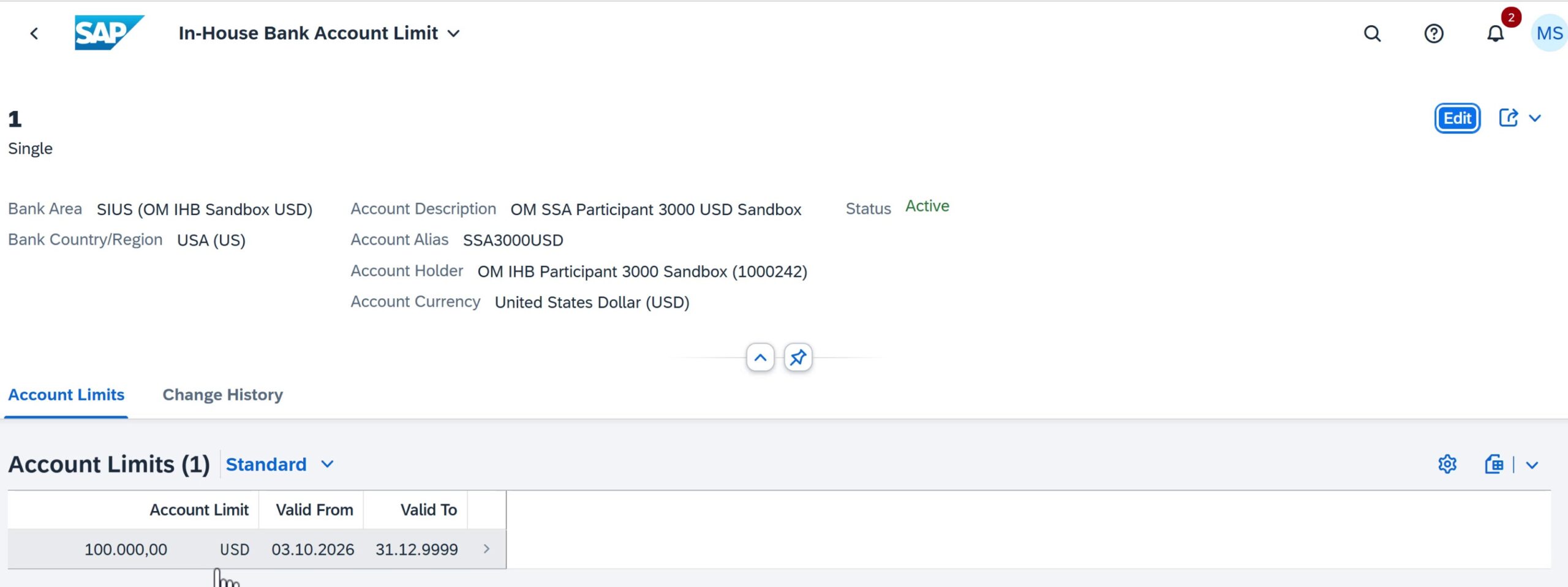
SIUS account 1 shows an active USD 100,000 limit from 3 Oct 2026 through 31 Dec 9999. Treasury can review breaches in Display In-House Bank Account Overdrafts.
Interest conditions
- Assignment levels
- Bank area, account group or single account
- Interest types
- Credit interest, debit interest and overdraft interest
- Rate design
Maintain rate and validity for each condition. The applicable threshold is part of the overdraft rule.
- Settlement
- Calculate the applicable condition during account balancing or settlement.
- Fiori Manage In-House Bank Conditions (F5941)
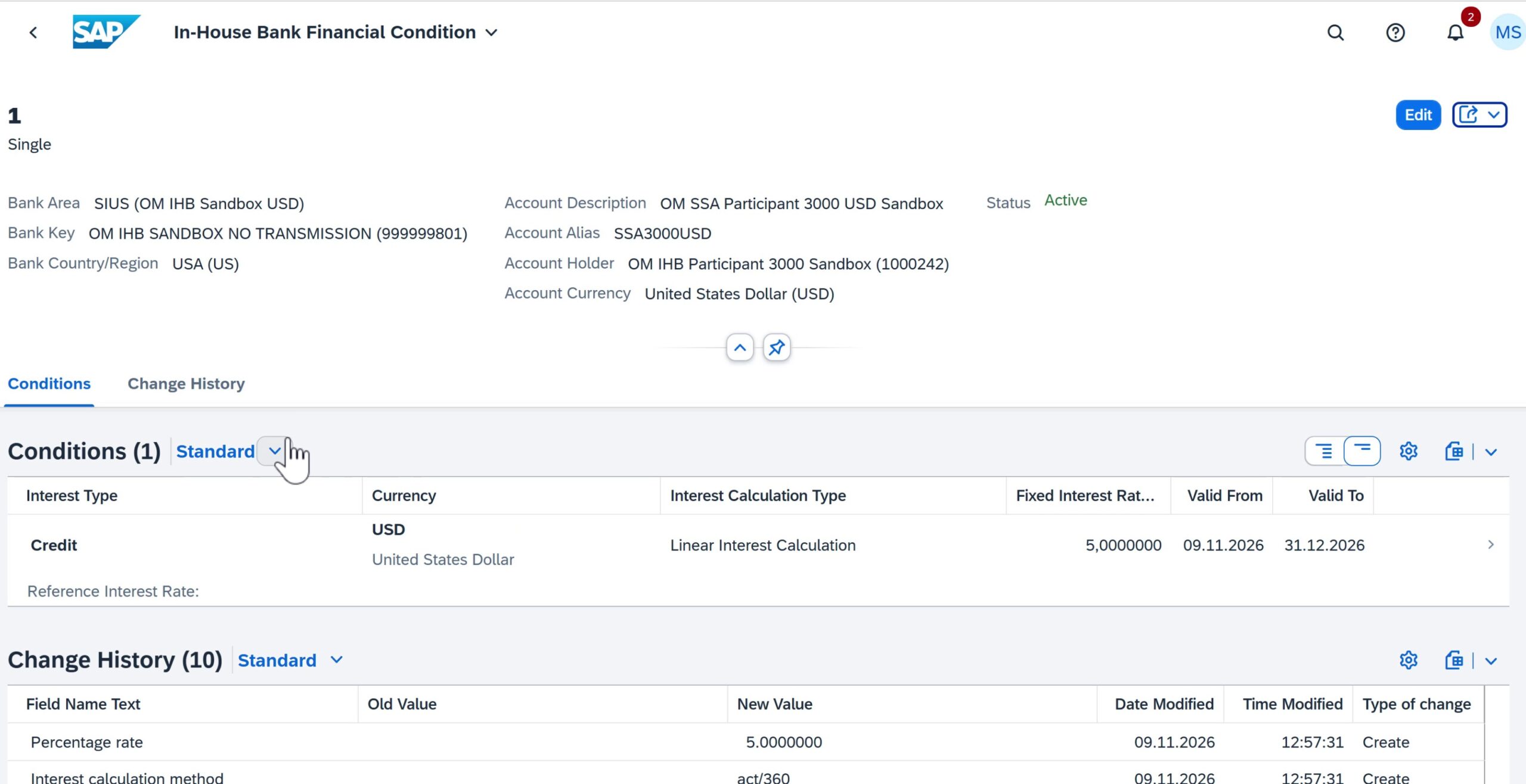
The active USD credit condition is fixed at 5% annually using linear Actual/360, valid 9 Nov–31 Dec 2026. Overdraft interest uses a separate condition and the applicable threshold.
IHB fees
- Maintenance
- Monthly account-maintenance fees
- Transactions
- Domestic, international and priority-payment fees
- Assignment
- Bank area, account group or single account
- Accounting
- Use activity type and fee-type mapping to derive the relevant posting.
- Fiori Manage In-House Bank Fee
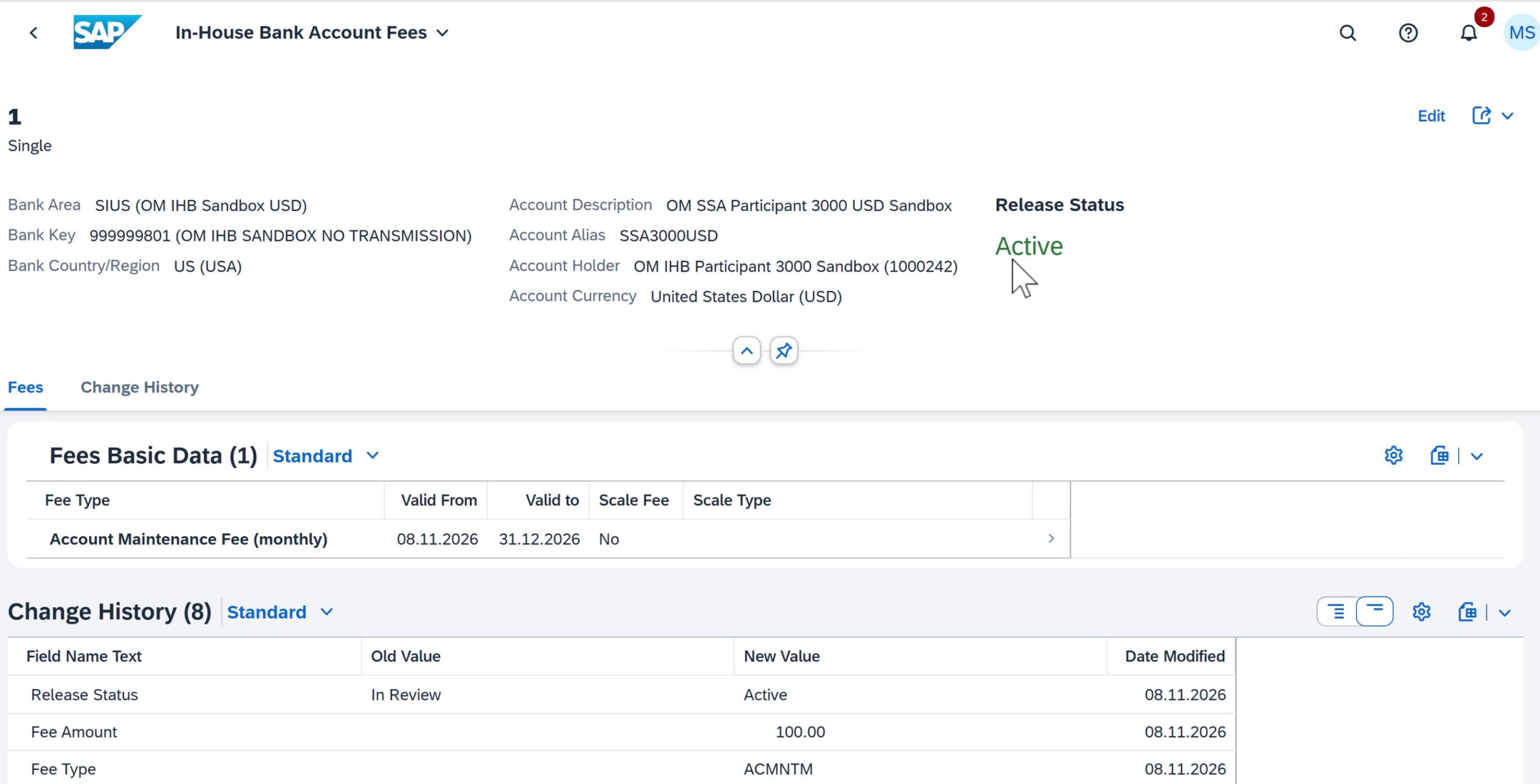
The active fee for SIUS account 1 is USD 100 monthly, valid 8 Nov–31 Dec 2026. The change history shows fee type ACMNTM and release from In Review to Active.
APM clearing and suspense accounts
SPRO → Advanced Payment Management → Define FI G/L Suspense Account (APM layer)
| Scenario | Configuration decision | Reconciliation purpose |
|---|---|---|
| PINO with routing | Scenario-specific bridge and account overlay | Match the routing legs |
| Internal transfer | Bridge for both participant legs | Offset internal debit and credit |
| POBO | APM-to-IHB and external-payment bridges | Match owner FI and settlement |
| Incoming cash | Receipt-related suspense handling | Match allocation to participants |
Show the PF on-behalf scenario 4 suspense mapping for USD. Teach the APM suspense mapping separately from the owner IHB FI derivation.
Expected POBO postings in company code 1710
Follow the same payment through /PF1/PO_EXPERT, /PF1/IHB_FI and FF_5. Verify the posted documents in the end-to-end test.
| Stage | Debit | Credit |
|---|---|---|
| APM outgoing clearing item | 113105 · Suspense | 113120 · External payment clearing |
| IHB-to-FI transfer | 164000 · Due from participant 3000 | 113105 · Suspense |
| External bank statement | 113120 · External payment clearing | 113100 · Owner main bank |
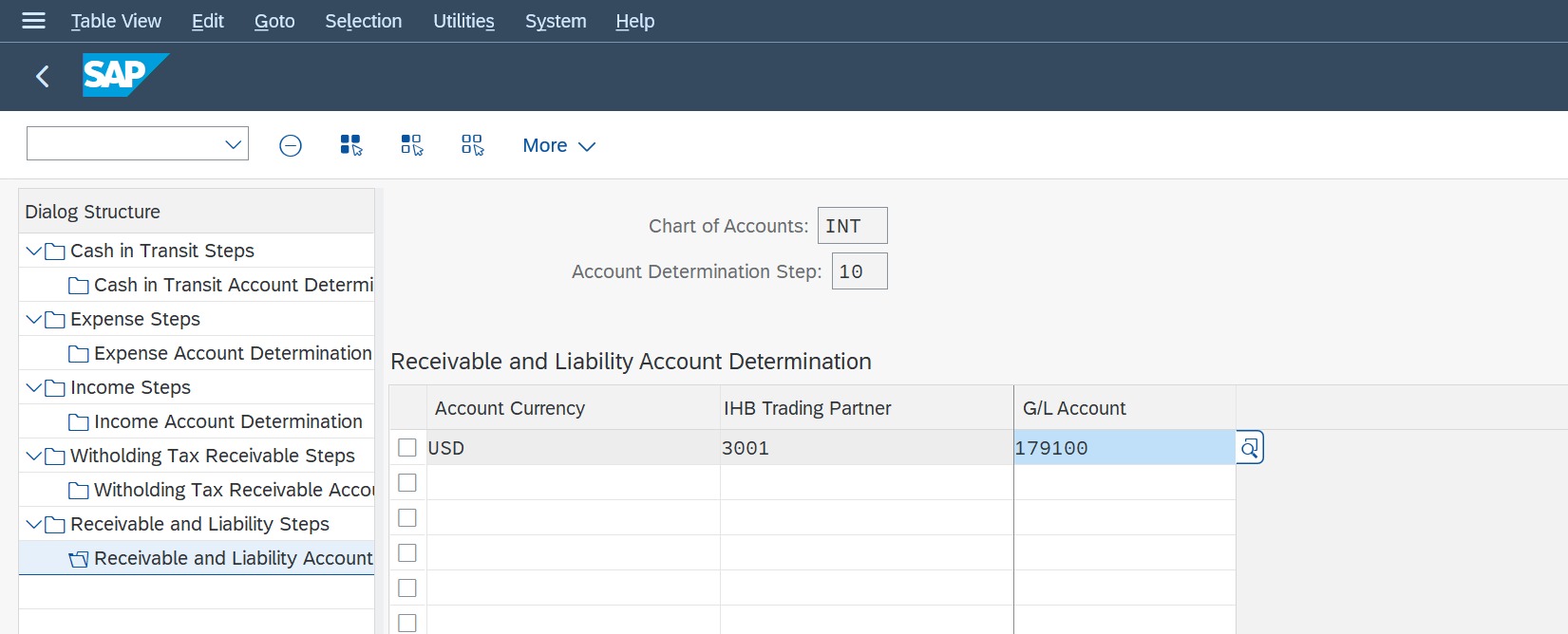
Show the SSA CASH and CASHINTRNT entries. Verify currency, trading partner and scenario before explaining which G/L each leg uses.
Additional integration and statement configuration
Use these settings to complete the interface and accounting design. External bank statement forwarding and internally generated IHB account statements have different configuration paths and should be verified separately.
The additional reference in the presentation is labeled SAP S/4HANA 2023.
MBC connector interface settings
SPRO > Financial Supply Chain Management > Advanced Payment Management > External Interfaces > File Handler > Multi-Bank Connectivity Connector Integration > Maintain Inbound Settings / Maintain Outbound Settings
Configuration step: For MBC integration, map the incoming message to an APM converter, then map the outgoing converter combination to the required MBC message type.
MBC routing and connectivity are scenario-specific. The SSA local-file examples do not prove external bank transmission.
| Key field | Value / required setting | Brief functionality |
|---|---|---|
| Inbound Sender / Message Type | Expected MBC message identity | Identifies the incoming interface |
| Inbound Converter ID | Converter for that message | Selects APM parsing and defaults |
| Outbound Channel / Medium / Format | Outgoing converter combination | Identifies the output interface |
| Outbound Message Type | Required MBC message type | Classifies the generated message |
FI posting g/l overlay and document type
SPRO > Financial Supply Chain Management > Advanced Payment Management > External Interfaces > Posting Interfaces > FI-GL > Define Pattern for G/L Overlay / Determine Document Types
Configuration step: For posting scenarios, derive the clearing G/L from the house-bank account and map the relevant APM transaction types to an FI document type.
The overlay changes selected account digits. If no overlay applies, the house-bank G/L is the default posting account.
| Key field | Value / required setting | Brief functionality |
|---|---|---|
| Clearing Area / Chart of Accounts | PF / INT | Scopes the account derivation |
| Format / Medium / Channel | Applicable output combination | Selects the overlay rule |
| G/L Overlay Pattern | ++++++++02 in SSA | 119900 becomes clearing G/L119902 |
| Transaction Type | Required posting-item types | Scopes the document-type mapping |
| FI Document Type | SA for recorded SSA types | Controls the FI journal category |
Source payment method and bank selection
FBZP > Payment Methods in Country / Company Code > Bank Determination OBPM4
Configuration step: At the source company, assign the payment method, payment medium and bank ranking that generate the intended PINO or IHB instruction.
The source instruction must contain the correct internal or external bank identity for subsequent APM scenario determination.
| Key field | Value / required setting | Brief functionality |
|---|---|---|
| Payment Method | H POBO/internal; G PINO | Selects the source payment flow |
| Company / Currency | 3000 / USD | Scopes the method and bank ranking |
| House Bank / Account ID | H:IHB01/IHBUS; G:SBX01/USD01 | Selects the source debtor account |
| Clearing G/L | H:119902; G:113102 | Posts the source payment clearing |
| Payment Medium / Variant | US_CGI_XML_CT / ZSSA3000XML | Creates the source payment XML |
Bank statements company-code settings
SPRO > Financial Supply Chain Management > Cash and Liquidity Management > Bank Account Management > Define Settings for Bank Statements
Configuration step: For bank-statement forwarding, maintain a valid company-code entry and enable file forwarding. Set posting behavior according to where accounting is performed.
Use No Posting Processing where the receiving system owns accounting. The book company example allows local EoD posting as well as forwarding.
| Key field | Value / required setting | Brief functionality |
|---|---|---|
| Company Code | Company owning the bank account | Scopes statement handling |
| Valid From | Effective configuration date | Starts the applicable settings |
| File Forwarding | Forwarding | Allows statement-file forwarding |
| Post. Category (EoD) | Required local posting behavior | Controls end-of-day posting |
| Intraday Post. Cat. | Required intraday behavior | Controls intraday posting |
Bank statements bank-account settings
Fiori: Define Bank Account Settings – Bank Statements
Configuration step: Create the account-specific setting for the BAM technical ID. For forwarding without local accounting, enable forwarding and suppress local posting.
Select the account whose statement is received. Confirm target-system routing in MBC and prove delivery and posting in an integrated test.
| Key field | Value / required setting | Brief functionality |
|---|---|---|
| Technical ID | Relevant BAM account ID | Identifies the individual bank account |
| Valid From | Effective account-setting date | Starts the account-specific rule |
| Posting Category (End of Day) | No Posting Processing | Prevents local EoD posting |
| Posting Category (Intraday) | No Posting Processing | Prevents local intraday posting |
| Bank Statement Forwarding | Forwarding | Enables forwarding for this account |
IHB account statement options
Fiori: Manage In-House Bank Accounts (F5942) > Account Options / Bank Statements
Configuration step: For internal IHB statements, enable the statement requirement, maintain its schedule and assign the recipient and output converter.
Internal IHB statement generation is separate from forwarding external bank statements. The detailed EOD execution remains in the IHB section.
| Key field | Value / required setting | Brief functionality |
|---|---|---|
| Bank Statement Required | Selected for the participant | Enables IHB statement generation |
| Bank Statement Frequency | Daily in the recorded setup | Sets the delivery schedule |
| Statement Recipient | Participant BP1000242 | Identifies the receiving entity |
| Converter ID | ZC53F | Creates internal CAMT.053 output |
| Original indicator | Selected in the recorded setup | Marks the original statement delivery |
IHB activity types
SPRO → Financial Supply Chain Management → Advanced Payment Management → In-House Bank → Define Activity Types for Account Management / Maintain Activity Type Criteria for Account Management
- Classification. Categorize the business transaction recorded in the IHB account.
- ISO attributes. Use domain, family, subfamily and credit/debit direction.
- FI transfer. Derive G/L handling from the assigned activity type and scenario.
- Fee relationship. Link applicable fee types where the delivered activity requires it.
Compare activity types and their ISO domain, family, subfamily and debit or credit indicator. Trace the selected activity into FI determination.
Account determination must cover both participants and the correct payment scenario.
SAP GUI SM34 → FJEPVC_IHB_ACC_DET | OBA7 → YP | IMG → Document Splitting
- INTERNAL CLEARING AND DOCUMENT SETTINGS
| Setting | Saved value | Purpose |
|---|---|---|
| CASHINTRNT IC00 | TP 3000 and 3001, USD, 113105 | Offsets both internal legs |
| CASHINTRNT PB00 | Existing POBO mapping retained | Preserves prior POBO flow |
| YP document type | Customer + Inter-Company, range 15 | Receiver F-28 posting |
| Revenue splitting | INT 800000, category 30000 | Receiver FB70 invoice |
Use the tutorial with the video lessons
The course follows the same seven lesson sequence and includes the companion presentation. Review the syllabus and preview, then use this article as a configuration reference alongside the recordings.
